Reading Time: 12 Minutes
Difficulty Level: Beginner to Intermediate
Reviewed By: FinanceInfoIn Editorial Team
Why Online Phishing Scams Are Becoming More Dangerous for Everyday Bank Users
I still clearly remember standing at the checkout line of a local grocery store, holding just a loaf of bread and some milk. The total was only a few dollars, but when I swiped my debit card, the machine beeped and flashed "Declined." Confused and a bit embarrassed, I stepped aside and quickly opened my banking app on my phone. My stomach completely dropped when I saw a zero balance.
Just a few hours earlier, I had clicked a link in a random text message about a missing package delivery, thinking absolutely nothing of it. That single, tiny mistake gave a complete stranger total access to my hard-earned money, leaving me completely broke and helpless in the middle of a busy store.
When something like this happens, the panic is overwhelming. You suddenly realize that your safety net is entirely gone.
Every single bill you need to pay, the rent that is due soon, and the food you need to put on the table all become massive sources of anxiety. You start questioning your own judgment.
Every time your phone buzzes with a new email or text message, your heart skips a beat. The mental peace you once had vanishes, replaced by a constant fear that someone is watching your every digital move.
We work incredibly hard for our money, sacrificing our time and energy every single day. Seeing it vanish into thin air because of a deceptive trick is one of the most frustrating experiences you can go through.
The sad reality is that these online thieves do not care about your struggles, your family, or your upcoming expenses. They operate silently in the background, hoping you make just one wrong click during a busy day.Table of Contents
- The Reality of Digital Deception
- Quick Summary
- Key Takeaways
- How Thieves Steal Your Financial Identity
- The Psychology Behind the Scam
- Practical Steps to Secure Your Finances
- Setting Up Unbreakable Digital Walls
- What to Do If You Click a Bad Link
- Myth vs. Reality in Digital Banking
- Building a Safer Financial Future
Quick Summary
Online financial traps are designed to steal your hard-earned money by tricking you into handing over your login details. You can easily defend yourself by learning to spot fake messages, turning on two-step verification, and never clicking on suspicious links. This guide breaks down exact, easy-to-follow steps to secure your money immediately.
Key Takeaways
- Always verify unexpected alerts directly through your official banking app.
- Turn on multi-factor authentication (MFA) for every financial platform you use.
- Never trust urgent demands for money or personal details over the phone or text.
- Keep your passwords completely unique for all your financial apps.
- Learn to spot bad URLs and fake email sender addresses.
How Thieves Steal Your Financial Identity
Think of your digital login details as the physical keys to your front door. You would never hand your house keys to a complete stranger on the street, right?
Yet, millions of people accidentally hand over their digital keys every single day. These online traps often come disguised as friendly or urgent messages from brands you already trust.
They might pretend to be your internet provider, a popular streaming service, or even your own bank. The goal is simple: make you panic so you act quickly without thinking.
The Psychology Behind the Scam
These thieves are experts at human behavior. They know that if they create a sense of extreme urgency, you are less likely to double-check the facts.
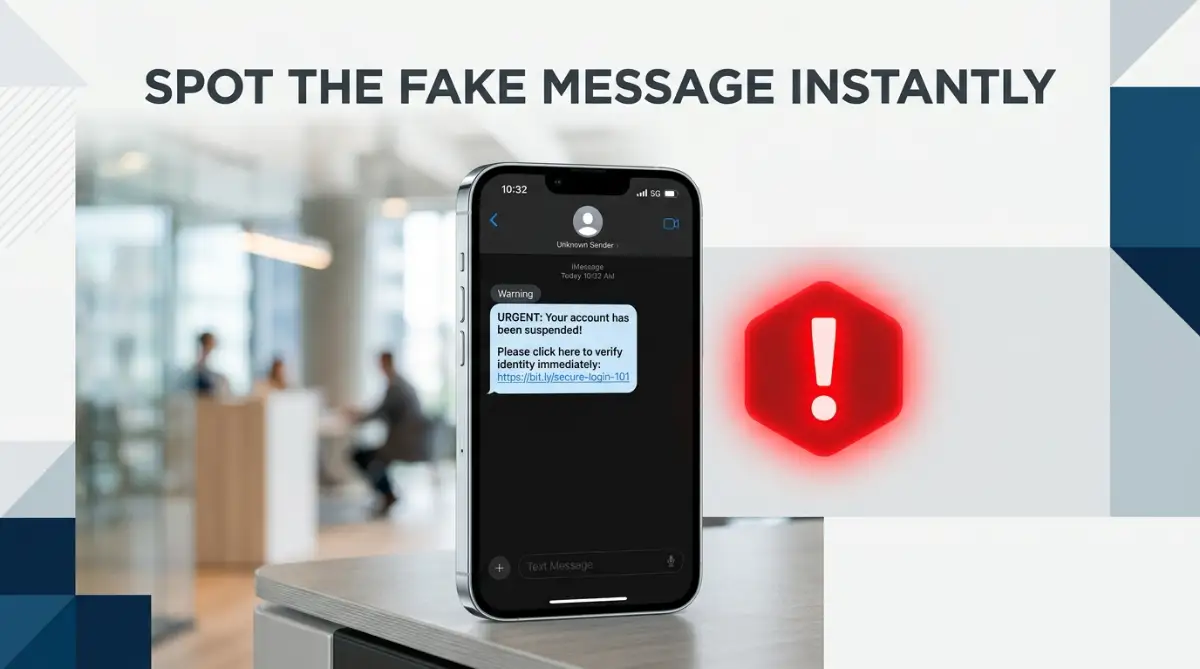
Imagine getting an email saying an unknown device just logged into your account and withdrew $500. Your immediate reaction is fear.
You naturally want to stop the transaction, so you quickly click the big red button in the email that says "Cancel Payment."
This takes you to a fake website that looks exactly like your real bank. When you type in your username and password to log in, you are actually handing those details directly to the thief.
Setting Up Unbreakable Digital Walls
You do not need to be a technology expert to keep your money safe. It just takes a few simple, practical habits to build a strong wall around your assets.
First, you must change how you respond to unexpected messages. If you receive an alert saying your account has a problem, completely ignore any links inside that message.
Instead, open a fresh internet browser window or use your official mobile app to log in directly. If there is a real issue, you will see a notification inside your secure dashboard.
Always Check the Sender Details
When you open an email, look closely at the sender's address. A message might say it is from "Customer Support," but if you tap on the name, the actual email address might look like a random jumble of letters and numbers.
Real institutions always use official, clean domain names.
I used to think using the same password for my bank and my streaming services was just a smart way to remember everything. I quickly realized this is the biggest mistake you can make. Always keep your banking password completely unique and never write it down in your phone's digital notepad.
Spotting a Fake Login Page
It is incredibly easy for bad actors to copy the exact design of a trusted website. They can steal the logos, the colors, and the fonts in just a few minutes.
However, they cannot easily copy the exact web address. Before you ever type a password, tap the top bar of your browser and read the URL carefully.
Look out for small spelling mistakes, like "secuure-bank" instead of "secure-bank." These tiny errors are a massive red flag.
Are You Being Asked for Strange Information?
Legitimate support teams will never ask you for your full password, your PIN, or the secure code texted to your phone.
If someone on the phone or through an online chat asks for these details, hang up immediately.
Check out this helpful video on recognizing common digital traps:
Practical Steps to Secure Your Finances Today
You can take action right now to lock down your accounts. The most effective tool you have is Multi-Factor Authentication (MFA), sometimes called two-step verification.
When you turn this on, knowing your password is no longer enough to get into your account. The system will ask for a second piece of proof, like a temporary code sent to your phone or an authenticator app.
Even if a thief completely steals your password, they cannot bypass this second step. It acts as a massive roadblock for anyone trying to access your funds remotely.
Myth vs. Reality in Digital Banking
There is a lot of bad advice out there regarding digital security. Let's clear up a few common misunderstandings.
Myth: Only older people fall for these tricks.
Reality: Highly educated young professionals are frequently targeted and tricked because the scams are highly sophisticated.
Myth: My bank will always refund me if I get tricked.
Reality: If you willingly handed over your login details, even by accident, some institutions might refuse to cover the loss. You must protect your own keys.
Myth: A green padlock in the browser means the site is 100% safe.
Reality: A padlock just means the connection is encrypted. Scammers can easily get encrypted sites for their fake pages.
What to Do If You Click a Bad Link
We are all human, and mistakes happen. If you realize you just clicked something bad or typed your details into the wrong place, speed is your best friend.
Do not wait to see what happens. Act instantly.
First, call the official number on the back of your debit or credit card. Tell the representative exactly what happened and ask them to freeze your accounts immediately.
Next, use a completely different device, like a family member's computer, to log into your account and change your password right away.
Expert Tip: Always keep the official customer service phone number of your primary institution saved in your phone contacts. If you ever feel panicked or suspicious about an alert, you will not have to waste time searching Google for the right number to call.
Maintaining Long-Term Financial Safety
Protecting your money is not a one-time task. It is a daily habit, much like locking the doors of your car when you park at the grocery store.
You should make it a routine to check your transaction history at least once a week. Do not wait for your monthly statement to arrive.
By keeping a close eye on your recent activity, you can easily spot tiny, unauthorized charges. Scammers often test a stolen card by charging just a few cents before attempting to steal thousands of dollars.
Always keep your phone and computer operating systems updated. Those annoying update notifications often contain powerful security patches that protect you from the newest digital threats.
Be highly protective of your personal information on social media. Avoid filling out those fun, viral quizzes that ask for your mother's maiden name, the street you grew up on, or the name of your first pet.
Thieves use these exact details to guess your security questions and reset your passwords without you ever knowing.
By combining healthy skepticism with strong digital barriers, you can confidently manage your money online without constantly looking over your shoulder. Trust your instincts. If an offer looks too good to be true, or a warning feels strangely aggressive, take a step back and investigate.
Your financial peace of mind is totally worth the extra five minutes it takes to verify a message. Stay alert, keep your digital keys hidden, and never let a random notification push you into making a hasty decision.
The Most Common Phishing Tricks That Criminals Use to Steal Banking Information
Taking your digital defense to the next level requires a bit more than just basic awareness. Scammers are constantly updating their tricks, and relying on old safety habits can leave your money totally exposed.
To truly outsmart modern financial thieves, you need to understand their advanced tactics and build multiple layers of protection. Think of it like a layered security system for your house.
If a burglar manages to pick the front door lock, they should immediately face an alarm system and a heavy indoor safe. We want to build that exact same structure for your banking apps.
One of the smartest moves you can make is to stop trying to memorize your passwords entirely. Instead, use a highly rated, encrypted password manager to handle your logins.
When you use a password manager, every single financial account gets a massive, random string of characters that is impossible to guess. It acts like an impenetrable vault, and you only need to remember one single master key to open it.
Pro Tip: I highly recommend setting up a dedicated, private email address that you use strictly for your banking and financial accounts. Never use this email for signing up on shopping sites, social media, or newsletters, which keeps it completely hidden from public data breaches.
Often, scammers rely on finding your email address from random website leaks. If your banking email is a complete secret, it becomes incredibly difficult for them to target you with fake alerts in the first place.
We also need to talk about the growing threat of AI voice cloning and highly targeted phone tricks. You might get a call where the person on the other end sounds exactly like a family member in distress or a polite bank manager.
If anyone ever calls you and asks for an emergency money transfer or a verification code, hang up the phone immediately. Always dial the official number directly to verify the story.

The Hidden Pitfalls That Cost People Thousands
Even the most careful people can fall into digital traps when they are caught completely off guard or rushed. I have seen incredibly smart friends lose their entire savings simply because they trusted the name popping up on their phone screen.
Scammers use cheap software to "spoof" phone numbers, making your caller ID display your local bank's actual name. When you answer, they will sound highly professional, polite, and ready to "help" you stop a fake fraudulent charge.
Another massive error is clicking the "unsubscribe" link inside an obvious spam email or random text message. You might think you are simply cleaning up your inbox to avoid future annoyance.
In reality, clicking that link silently confirms to the scammer that your email address is active and monitored by a real person. This small mistake usually leads to double the amount of scam messages hitting your phone the very next week.
Common Mistakes to Watch Out For
- Trusting Search Engine Ads: People often Google their bank's login page and click the very first sponsored ad they see. Scammers frequently buy ads to put their fake websites at the top of your search results.
- Connecting to Public Wi-Fi: Logging into your financial apps while sipping coffee on a public café network is a huge risk. Hackers can easily intercept your wireless data and steal your session cookies.
- Ignoring Software Updates: Dismissing those annoying phone update alerts leaves your device open to known security holes. Those updates contain powerful patches that block new hacking methods.
- Oversharing on Social Media: Posting pictures of your new car, house keys, or travel plans gives thieves the answers to your security questions.
Protecting your bank account is just one part of your overall financial safety net. Similar to how you might carefully research what does comprehensive auto insurance actually cover in a crisis, you must know exactly what your bank covers if fraud happens.
If you do not fully understand your bank's fraud policy, you might be unpleasantly surprised when they refuse to refund your stolen money. Always read the fine print regarding unauthorized transactions.
It is highly similar to learning how to understand your insurance declaration page without confusion—the details dictate your level of protection. Taking a few minutes to read these documents can save you from a massive financial disaster down the road.
Your Quick Action Checklist for Immediate Safety
Do not wait until a disaster strikes to start building your digital walls. By the time you notice missing funds, it is often too late to get them back smoothly.
A sudden financial loss from a digital theft can derail your entire monthly budget in seconds. You might suddenly find yourself desperately searching for how to lower your auto insurance premium without losing essential coverage just to make ends meet.
Financial literacy means protecting your hard-earned assets across the board. Take ten minutes today to run through these highly effective safety steps.
Quick Action Checklist
- Turn on two-step verification for your primary email and all banking apps.
- Set up push notifications on your phone for any transaction over one dollar.
- Delete any old financial apps you no longer actively use.
- Save your bank’s official fraud department number in your phone contacts right now.
- Clear your browser's saved passwords if you are not using a secure manager.
Taking these proactive steps creates a solid foundation for your financial peace of mind. Just as you want to know why your car insurance claim was denied and how to fix it, you need to know how to fix a potential fraud issue with your bank.
If a thief drains your checking account, you might miss a regular bill payment, leading to massive headaches. It is honestly just as stressful as trying to stop your auto insurance company from denying claims.
Taking Full Control of Your Financial Security
The truth is, digital thieves are hoping you are too busy, tired, or distracted to notice their tricks. They rely heavily on your daily stress to slip right past your normal defenses.
By simply slowing down and verifying every single message, you instantly cut off their main path to your money. You have the total power to stop them in their tracks just by refusing to click a random link.
I know managing all these security steps can feel a bit overwhelming at first. However, once you make them a natural part of your daily routine, you will feel incredibly empowered and confident online.
I have personally felt the deep anxiety of nearly losing my money to a clever text message trap. Taking a few minutes to secure my accounts gave me my peace of mind back, and I want the exact same for you.
Do not let these unseen criminals dictate your financial future. Lock your digital doors, guard your keys, and keep your hard-earned money exactly where it belongs.
What is the very first security step you are going to take today to lock down your accounts? Let me know in the comments below!
Frequently Asked Questions About Bank Fraud Prevention
How can I quickly tell if a text from my bank is fake?
Look closely at the phone number sending the text. If it is a long, random ten-digit number instead of a shortcode, or if it contains a link asking you to verify details, it is almost definitely a scam.
Will my bank ever ask for my password over the phone?
No, a legitimate bank representative will never ask for your password, PIN, or the one-time security code sent to your phone. If someone demands this information, hang up immediately.
What happens if I accidentally clicked a phishing link but did not type anything?
If you did not enter any personal information, your bank account is likely safe. However, you should completely clear your web browser's cache and run a quick antivirus scan on your device just to be sure.
Does changing my password frequently actually help?
Changing it frequently is less important than having a very long, totally unique password for each site. Only change your password if you suspect it has been compromised in a public data breach.
Is it safe to use my bank app on public Wi-Fi?
No, public Wi-Fi networks in cafes or airports are highly insecure. Always use your mobile cellular data or a trusted Virtual Private Network (VPN) when checking your bank balance in public.
Can a scammer steal money if they only have my bank account number?
Having just the account number is usually not enough to directly drain your funds, but they can use it to create fake checks or initiate unauthorized automated transfers. Always report a exposed account number to your bank right away.
Why did my bank send a security code when I did not try to log in?
This usually means a hacker has your password and is trying to break in, but the two-step verification stopped them. You should log in immediately using a safe device and change your password.
Can I get my money back if I was tricked into sending it?
It entirely depends on the situation and how quickly you report the fraud. If you willingly authorized the transfer, even under false pretenses, some financial institutions may unfortunately refuse to refund the loss.
Trusted Legal Resources
- Federal Trade Commission (FTC) - Recognizing Phishing
- Cybersecurity & Infrastructure Security Agency (CISA)
- Consumer Financial Protection Bureau (CFPB) Fraud Prevention
- IdentityTheft.gov - Official Recovery Plans
- Internet Crime Complaint Center (IC3)
- National Cybersecurity Alliance - Safe Banking
Disclaimer: The information provided in this article is strictly for educational and informational purposes only and does not constitute professional financial, legal, or cybersecurity advice. We strongly encourage you to consult directly with your primary banking institution or a certified financial advisor regarding your specific security needs. The authors and the FinanceInfoIn team assume no responsibility or liability for any financial losses or damages resulting from the use of this information.
About the Author
Reviewed by Mithun Halder (Personal Finance & SEO Expert) & The FinanceInfoIn Editorial Team
The FinanceInfoIn Editorial Team researches personal finance, investing, insurance, mortgages, cryptocurrency, and consumer financial topics. Every article is carefully reviewed to provide clear, practical, and trustworthy educational information based on credible sources and industry best practices.
©2026 FinanceInfoIn. All rights reserved.