The Invisible Engine: Why Modern Apps Feel Smarter Than Ever
Have you ever wondered how your favorite apps seem to know exactly what you need? The answer is machine learning, a technology that learns from patterns instead of reading your mind. From personalized recommendations to smarter search results, it quietly powers many of the digital tools we use every day. This guide explains how it all works in simple, beginner-friendly language.
Have you ever felt the same way? From personalized playlists to smart keyboards and shopping recommendations, many everyday apps seem to know what you want before you ask.
The truth is much less mysterious than it appears. These features are powered by machine learning, a technology that recognizes patterns in data to make helpful predictions rather than secretly listening to your conversations.
Once you understand how it works, modern software feels far less intimidating. This guide explains the basics in simple language so you can use your favorite apps with greater confidence.
- Many people search for simple explanations online, only to find pages filled with complex coding terms and mathematics.
- Search results are often packed with confusing jargon like neural networks and stochastic gradient descent that make regular readers give up.
- Sensational headlines often make this technology seem more mysterious than it really is, increasing unnecessary fear and confusion.
- Without clear and simple guides, we either remain confused or fall for common myths about how our data is being processed.
- Feeling confused about modern tech can make us feel left behind in a rapidly changing digital age.
- We might avoid using helpful app features because we do not trust how the system makes its decisions.
- This lack of trust can make us feel anxious every time an app offers a personalized recommendation.
- When we do not understand the tools we rely on daily, we lose our sense of confidence and digital security.
This gap in our understanding is why we need to understand what is happening behind our screens. The secret behind these smart features is not magic or hidden surveillance; it is a technology called machine learning.
By understanding this concept in simple terms, we can regain our confidence and make better decisions about the software we use every day. Let us break down how this technology works and how it helps us in our daily tasks.
How Machine Learning Learns from Data
To understand how machine learning works, we do not need a degree in computer science. We can think of it as a way of training software to recognize patterns, much like how we learn from experience.
Instead of writing strict rules for every possible situation, programmers give the software a way to learn on its own. Here is a simple, three-step look at how this learning process actually happens.
Before we jump into the three easy steps below, watch this quick and fun video that perfectly explains how smart software learns from us in real time. It will make the rest of this guide even easier to understand, so check it out and keep reading!
Phase One: Collecting the Digital Building Blocks
The first step in any smart system is gathering information, which we call data. Just like a child needs to see many pictures of animals to learn the difference between a cat and a dog, software needs examples to learn from.
For instance, your email app needs to see thousands of examples of regular emails and junk emails. These examples serve as the learning material for the system.
The process begins when we feed regular emails and spam emails directly into the learning system so it can study them. the algorithm does not just look at these emails once; it studies them to find subtle clues.
It looks at the words used, the sender's address, and even the time the message was sent. This phase is all about preparing the raw ingredients so the system has enough information to study.
Without this starting information, the technology cannot begin to learn or make smart choices. It is the essential foundation for everything that follows.
Phase Two: Recognizing Common Habits and Patterns
Once the system has enough examples, it starts looking for common traits. This is where the actual learning takes place.
The software uses mathematical formulas to find connections that humans might not notice. For example, it might notice that junk emails often contain specific words or weird link addresses.
The software starts by analyzing the raw data, spotting repeating words, and then building a flexible rule book. It builds a digital rule book based on these repeating patterns.
This rule book is not permanent; it changes and improves as the system sees more examples. If the system makes a mistake and labels a good email as junk, a human can correct it.
The software remembers this correction and updates its rule book so it does not make the same mistake again. Over time, the algorithm becomes incredibly accurate at identifying these patterns.
Phase Three: Making Smart Guesses in Real Time
After building and refining its rule book, the technology is ready to work on its own. When you receive a new email, the software compares it to the patterns it learned during its training.
It calculates the probability of the new email being junk based on its digital rule book. If the probability is high, the app automatically moves the message to your spam folder.
When a new email arrives, the system checks it against the pattern rule book and delivers it to either your inbox or your spam folder. This whole process happens in a fraction of a second, before you even open your phone.
The app does not need to ask you for help because it has already learned what you likely want. This simple three-step cycle of collecting data, finding patterns, and making guesses is what powers almost every smart app on your phone.
Where You Meet Smart Code in Your Daily Life
Now that we know how the technology learns, let us look at where this technology shows up in our everyday software. You might be surprised by how many of your favorite apps rely on these smart patterns.
Smart Keyboards and Quick Text Suggestions
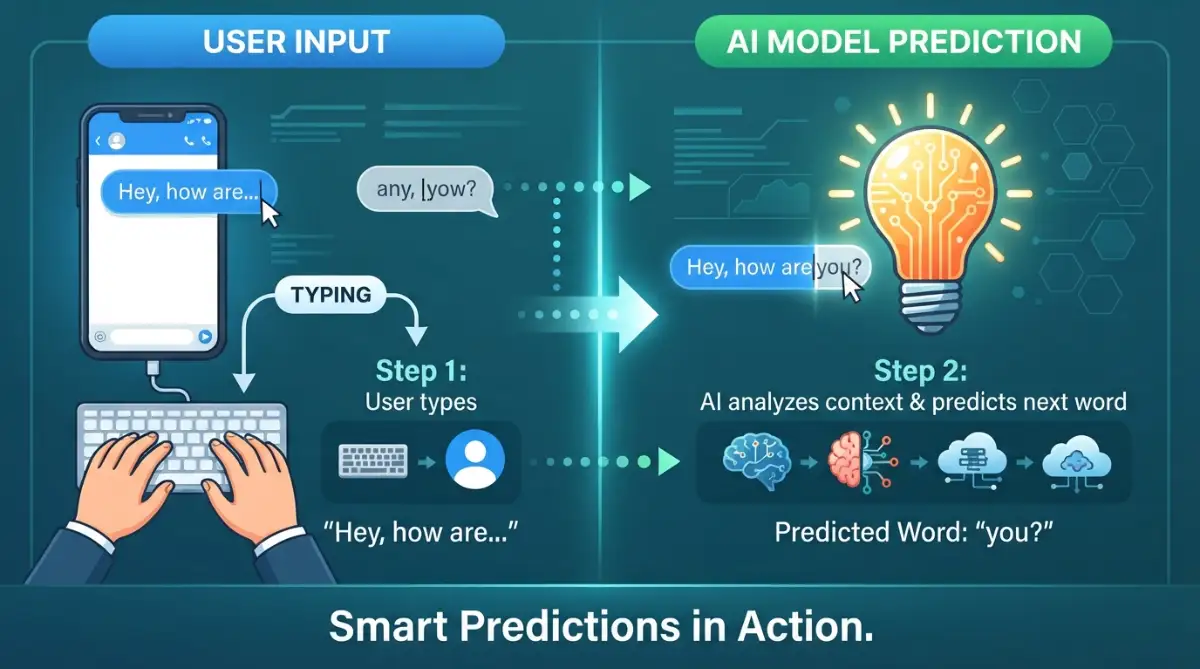
We use our messaging apps every day to stay in touch with friends and family. Your phone's keyboard uses smart pattern recognition to make typing faster and easier.
As you type, the keyboard guesses the next word you are likely to use based on your past conversations. If you often type "good morning," the keyboard will suggest "morning" as soon as you type "good."
It also learns your personal slang and typing habits over time. This personalized learning is why your keyboard suggestion list looks very different from anyone else's.
It adapts to your personal style of communication without forcing you to change how you speak. This makes daily communication fast and completely effortless.
Streaming Services and Custom Playlists
When you sit down to watch a show or listen to music, you do not want to spend hours searching for something good. Streaming apps solve this problem by looking at what you have enjoyed in the past.
The app compares your viewing habits with millions of other users who share similar tastes. If other users who liked your favorite show also enjoyed a new movie, the app will recommend that movie to you.
This clever system helps you find new content that matches your unique style without any extra effort on your part. It is like having a personal assistant who knows your exact taste in art and entertainment.
Over time, the recommendations become even more accurate as you continue to watch and listen. This keeps your digital entertainment fresh and exciting.
Navigation Apps and Traffic Predictions
When you plan a trip, your navigation app does not just show you a map. It predicts the fastest route and tells you exactly when you will arrive at your destination.
To do this, the app looks at live speed data from thousands of other drivers on the road. It also analyzes historical patterns, like how busy a specific street usually gets during rush hour.
By combining this information, the system can warn you about traffic jams before you even see them and suggest a faster detour. This helps you avoid stressful delays and arrive at your destination on time.
The algorithm constantly recalculates your route in the background as conditions change. This ensures you always have the most accurate information available.
The Benefits of Smart Software in Our Daily Routine
Using this smart technology in our software brings several practical benefits to our lives. It is not just about making things feel modern; it is about making our daily tasks easier and more efficient.
Saving Us Time and Effort
The most obvious benefit of smart software is the time it saves us. By automating small, repetitive tasks, these apps free up our minds for more important things.
We do not have to manually sort through junk mail, search for directions, or spend hours looking for new music. The apps handle these chores quietly in the background.
This automation allows us to get things done faster and enjoy a smoother experience when using our devices. It reduces our mental load and lets us focus on what truly matters.
Creating a Truly Personalized Experience
We all have different preferences, habits, and needs. Smart software recognizes this by adapting to each individual user.
Instead of a one-size-fits-all setup, our apps adapt to fit our unique daily routines. Your navigation app remembers your daily commute, and your news app highlights topics you care about.
This personalization makes our digital tools feel like they were custom-built just for us. It creates a sense of comfort and ease that standard software simply cannot match.
Helping Us Make Better Choices
With so much information available online, making simple decisions can feel overwhelming. Smart apps help reduce this stress by filtering out the noise.
By presenting us with the most relevant options, these apps make it easier to choose a movie, find a restaurant, or plan a travel route. This gentle guidance helps us feel more confident in our decisions and less stressed by digital clutter.
It empowers us to make informed choices without feeling overwhelmed by too many possibilities. This balance of choice and convenience makes our digital lives much simpler.
How We Can Use Smart Apps Safely and Confidently
While these smart systems are incredibly helpful, it is important to use them with awareness. We can take a few simple steps to make sure we keep our digital life safe and enjoyable.
Managing Our App Permissions
Most smart apps need data to work well, but we should always control how much we share. Take a moment to look at your app settings and turn off permissions that do not seem necessary.
For example, a music app does not need access to your physical location to recommend songs. Keeping your permissions limited helps protect your privacy while still letting you enjoy the app's features.
It gives you the power to decide what information you want to share with the digital world. This simple habit keeps your personal data secure.
Giving Clear Feedback to the System
You can help your apps work better by giving them clear feedback. If a music app recommends a song you do not like, use the "skip" or "dislike" button.
This feedback tells the technology's rule book that it made a mistake, helping it make better recommendations next time. It is a simple way to shape your digital tools to better fit your real-world tastes.
Think of it as training a helpful assistant to understand your preferences. Your active feedback makes the software much more useful over time.
Keeping Our Apps Updated
Software developers are constantly working to improve their systems and make them more secure. Keeping your apps updated ensures you have the latest safety features and the smartest system rules.
Most devices can update apps automatically overnight, making it easy to stay current without any extra work. This ensures your software remains reliable, secure, and ready to assist you.
Understanding how these systems work helps us appreciate the clever engineering behind our daily tools. By taking control of our settings, we can enjoy the convenience of smart software with complete peace of mind.
Taking Control: Expert Strategies to Master Your Smart Apps
Now that we understand the basic learning process behind our favorite software, it is time to step up our game. You do not have to just sit back and accept whatever your phone decides to show you. We can actively shape how these digital tools learn about us and our daily habits.
To truly master these systems, we need to treat them like eager students who need proper guidance. If you feed the software bad information, you will get bad suggestions in return. This is why understanding basic digital privacy rights is a great first step in taking control of your online presence.
When you know what information apps collect, you can decide exactly what you want to share. You can learn more about protecting your personal information by reviewing the consumer safety guidelines provided by the FTC, which helps you secure your everyday devices.
By taking charge of your data, you force the software to work for you, rather than the other way around. Leading technology experts at places like MIT Technology Review regularly highlight how user behavior directly changes software outcomes.
You have the power to train your apps to be more helpful, more accurate, and less annoying. Let us look at three highly effective methods to manage your digital helpers.
Actively Curate Your Daily Digital Diet
Your phone learns entirely from your daily interactions, clicks, and viewing time. Every time you stop scrolling to watch a video, the system takes a digital note. It assumes you want to see more content exactly like that one.
If you accidentally click on sensational news or junk videos, the technology will flood your screen with similar content. To fix this, you need to be very intentional about what you interact with. Start liking, saving, and sharing only the content you actually want to see more of in the future.
Think of it like choosing the right food for a healthy diet. If you feed the system high-quality choices, your app experience will become much more useful and inspiring. Over time, the software will drop the junk and only show you things that add real value to your day.
Perform a Regular Algorithm Reset
Sometimes, a learning system gets completely confused by our changing interests. You might spend a weekend searching for dog toys for a friend, and suddenly your whole phone thinks you own a pet. When an app gets stuck on a wrong idea, you can easily force it to forget.
Almost all modern apps have a setting to clear your search history or reset your recommendations. By clearing this data, you wipe the system's current rule book clean. This gives you a fresh start to rebuild the technology's understanding of your true preferences.
Doing this once every few months keeps your software running smoothly and accurately. It prevents the system from dragging old, outdated assumptions into your current daily routine.
I learned this the hard way after spending a whole weekend searching for funny cat videos for my niece on my phone. By Monday, my entire video feed was ruined with nothing but meowing cats, hiding all the tech channels I actually follow. Clearing my watch history immediately brought my recommendations back to normal, and within a day my favorite tech channels started appearing again.
Use Smart Financial and Business Tools Wisely
Learning software is incredibly helpful when managing our personal finances or running a small business. Many modern budgeting apps study your spending patterns to warn you before you overspend. They can even predict your upcoming bills based on past months.
For business owners, predictive software can forecast revenue and highlight potential money shortages. Understanding these cash patterns is essential, especially when figuring out why bootstrapped startups collapse early and cash flow fixes can save a new company. The software gives you a heads-up so you can make smart adjustments before a crisis hits.
Similarly, if you are planning to buy a house, financial apps use predictive models to estimate your loan approval odds. They can help you organize your budget by showing you how to lower your debt-to-income ratio before a mortgage application. By using these smart tools, you turn complex math into simple, manageable daily actions.

The Hidden Traps: Five Costly Mistakes Users Make Every Day
Even with the best intentions, it is very easy to misuse smart technology. When we treat our software like an all-knowing magic box, we run into serious problems. Knowing what to avoid is just as important as knowing how to use these tools properly.
Here are five major mistakes people make when interacting with smart apps, and how you can easily avoid them.
1. Blindly Trusting Every App Suggestion
The most common trap is assuming the computer is always right. We have all heard stories of people driving their cars into lakes because their GPS told them to turn left. The software is just making highly educated guesses based on math, and math can sometimes lack common sense.
You should always use your own eyes and human judgment to verify what the app tells you. If a navigation route looks dangerous, ignore the screen and take a safer path.
If a shopping app suggests a highly rated product that looks fake, trust your gut and skip it. Your common sense will always be smarter than any digital prediction model.
2. Expecting Apps to Replace Real Human Verification
Many apps promise to analyze complex real-world situations for us, like estimating the market value of a home. An app can look at neighborhood data and guess a price, but it cannot see a leaky roof or broken pipes. Trusting only the digital estimate can lead to terrible financial decisions.
When making big life choices, software should only be a starting point, not the final answer. For example, buying a house based solely on a real estate app's score is incredibly risky. You still need to rely on professional human help to find the major warning signs to spot in a home inspection.
Always pair the speed of smart software with the careful, detailed verification of a real human expert. This balanced approach protects you from expensive and stressful mistakes.
3. Ignoring Your Digital Privacy and Data Settings
Many users simply click "Accept All" when downloading a new app without reading what they are giving away. This allows the software to track everything from your location to your personal contacts. Over time, this massive collection of personal data becomes a major security risk.
You must treat your personal data with the same level of care that you treat your money. Just as you would learn the easy security steps to secure your crypto wallet, you need to lock down your app permissions.
Go into your phone settings today and turn off microphone, camera, and location access for apps that do not need them. A calculator app simply does not need to know where you are standing to do its job.
4. Creating an Accidental Digital Filter Bubble
Smart apps love to show us things we already agree with because it keeps us happy and scrolling. However, this creates a dangerous "filter bubble" where we never see new ideas or different opinions. If you only click on news that matches your current views, the system hides everything else.
This constant reinforcement can heavily twist our view of the real world. We start to believe that everyone thinks exactly like we do, which is rarely true.
To break out of this bubble, make an effort to follow diverse topics and read varying opinions. Confuse the technology a little bit by exploring new hobbies, reading different news sources, and expanding your horizons.
5. Feeding the System Inconsistent Information
If you share a streaming account with three other family members, the learning system will get totally confused. One person watches action movies, another watches cartoons, and a third watches documentaries. The app's rule book breaks down because it cannot find a clear, consistent pattern.
This results in terrible recommendations for everyone involved. To get the best out of smart software, set up separate user profiles for each family member.
This allows the app to build a highly accurate, personalized rule book for each specific person. The cleaner the data you provide, the better the software will work for you.
Embracing Smart Technology With Complete Confidence
We have explored the invisible engine that powers the modern digital world. You now understand that these systems are not reading your mind; they are simply matching mathematical patterns. This knowledge instantly removes the mystery and fear surrounding modern digital tools.
You know how the software collects data, builds its rules, and makes its rapid guesses. More importantly, you now possess the practical strategies to train these apps to serve you better. You are no longer just a passive user; you are the one holding the remote control.
Your Action Plan for Today
Start small by picking just one app on your phone that feels a bit too cluttered or annoying. Go into its settings, clear the cache or history, and check its data permissions. Take away any access it does not strictly need to function.
Next time you scroll through a social feed, be very picky about what you click on. Spend a few seconds liking the posts you truly value, and quickly scroll past the ones you dislike. Within just a few days, you will notice the app becoming significantly more useful and aligned with your real interests.
The software we use every day is designed to make our lives easier, faster, and more enjoyable. By applying these simple guidelines, you can safely navigate the digital world and make technology work beautifully for you.
Five Article Highlights:
01. Smarter Everyday Apps
Learn how modern apps personalize recommendations, improve security, and automate daily tasks.
02. Learning from Data
Discover how software analyzes patterns to make accurate predictions and improve over time.
03. Real-World Examples
Explore how streaming platforms, navigation apps, spam filters, and online stores use intelligent technology.
04. Benefits and Challenges
Understand the advantages, limitations, and why high-quality data is essential for reliable results.
05. Why It Matters
See how understanding the basics of AI-powered software helps you use modern technology with greater confidence.
Technology feels much less intimidating once you understand what is happening behind the screen. You do not need to become an AI expert to make smarter choices online. Simply knowing how machine learning works can help you use everyday apps with more confidence, protect your privacy, and enjoy technology without unnecessary worry. Small changes in how you use your apps today can make a meaningful difference tomorrow
Disclaimer:
The information provided in this blog post is for educational and informational purposes only. It does not constitute professional tech, financial, or legal advice. Always review your own software settings and consult with certified professionals before making significant decisions based on digital tools or predictive applications. We are not responsible for any issues arising from software updates or changes in app policies.